> ## Documentation Index
> Fetch the complete documentation index at: https://docs.elementary-data.com/llms.txt
> Use this file to discover all available pages before exploring further.
# Incident Merging
When multiple incidents share the same root cause, merging them into a single incident reduces noise and gives your team a unified view of the issue. Elementary supports three ways to merge incidents: manually, through the AI agent, or automatically via merge rules.
## Manual merge
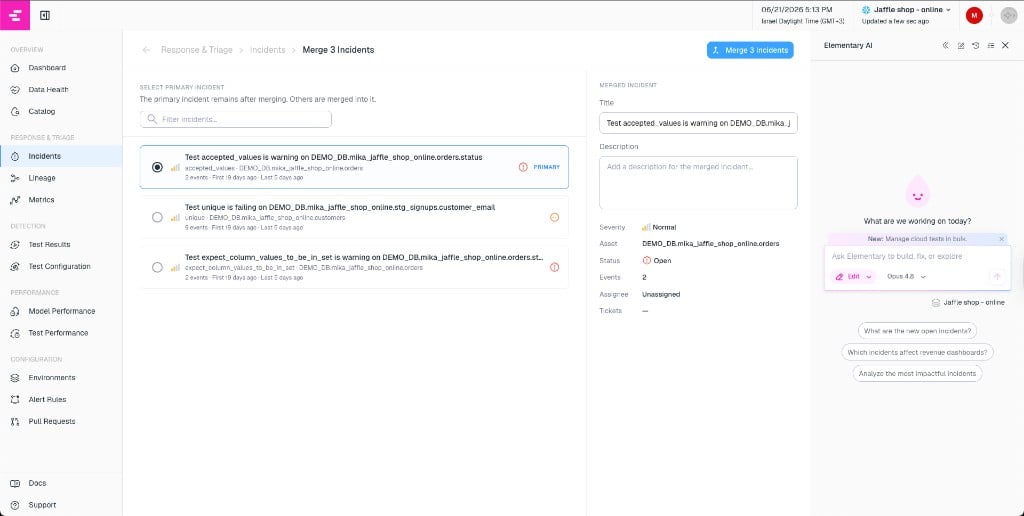
To merge incidents manually:
1. In the incidents list, select two or more open or acknowledged incidents using the checkboxes.
2. Click **Merge** in the floating action menu that appears at the bottom of the screen.
3. On the merge page, choose which incident should be the **primary** — this is the one that survives with all monitors combined.
4. Edit the merged incident's title and summary if needed.
5. Click **Merge Incidents** to confirm.
 After merging:
* The primary incident stays open and inherits all monitors from the merged incidents.
* The merged incidents are resolved with reason "Merged" and hidden from the main list.
* A "Merged" chip appears on the primary incident in the list view when it contains multiple monitors.
## Auto-merge rules
Auto-merge rules let Elementary automatically group related incidents as they are created, without manual intervention.
To configure auto-merge rules, click the **gear icon** on the incidents page to open the settings menu.
### Freshness issues
When enabled, freshness incidents affecting the same upstream source are automatically merged into a single incident. This is useful when a source goes stale and causes freshness failures across many downstream tables — instead of creating a separate incident for each table, they are grouped together.
The rule requires at least two freshness failures from the same source within a one-day window before merging them.
## AI agent-assisted merge
The [Triage & Resolution Agent](/cloud/ai-agents/triage-resolution-agent) can investigate multiple open incidents, identify shared root causes, and propose merging them. When the agent suggests a merge:
1. A merge plan appears in the chat with the selected incidents and a proposed primary.
2. Review the plan and click **Confirm** to proceed.
3. You are taken to the merge page with everything pre-filled, where you can make final edits before merging.
This is particularly useful when you have many open incidents and want to quickly identify which ones are related.
## Splitting incidents (undo a merge)
If monitors were incorrectly merged, you can split them back out:
1. Open the merged incident and go to the **Monitors** tab.
2. Select the monitors you want to detach using the checkboxes.
3. Click **Detach** and confirm.
Each detached monitor becomes a new open incident. If all monitors are detached, the original incident is resolved.
## How merged incidents appear
| Where | What you see |
| ------------------------- | ------------------------------------------------------------------------------------------------------------------------------------------ |
| **Incidents list** | A "Merged" chip on incidents with multiple monitors. Merged child incidents are hidden — only the primary shows. |
| **Merged child incident** | An info banner at the top: "This incident has been merged into \[primary incident]" with a link to the primary. The incident is read-only. |
| **Monitors tab** | All monitors from merged incidents appear on the primary incident. |
| **Timeline** | Events showing when monitors were added from or removed to other incidents, with links. |
| **Quick filters** | Use the "Merged" quick filter to show only incidents that contain multiple monitors. |
After merging:
* The primary incident stays open and inherits all monitors from the merged incidents.
* The merged incidents are resolved with reason "Merged" and hidden from the main list.
* A "Merged" chip appears on the primary incident in the list view when it contains multiple monitors.
## Auto-merge rules
Auto-merge rules let Elementary automatically group related incidents as they are created, without manual intervention.
To configure auto-merge rules, click the **gear icon** on the incidents page to open the settings menu.
### Freshness issues
When enabled, freshness incidents affecting the same upstream source are automatically merged into a single incident. This is useful when a source goes stale and causes freshness failures across many downstream tables — instead of creating a separate incident for each table, they are grouped together.
The rule requires at least two freshness failures from the same source within a one-day window before merging them.
## AI agent-assisted merge
The [Triage & Resolution Agent](/cloud/ai-agents/triage-resolution-agent) can investigate multiple open incidents, identify shared root causes, and propose merging them. When the agent suggests a merge:
1. A merge plan appears in the chat with the selected incidents and a proposed primary.
2. Review the plan and click **Confirm** to proceed.
3. You are taken to the merge page with everything pre-filled, where you can make final edits before merging.
This is particularly useful when you have many open incidents and want to quickly identify which ones are related.
## Splitting incidents (undo a merge)
If monitors were incorrectly merged, you can split them back out:
1. Open the merged incident and go to the **Monitors** tab.
2. Select the monitors you want to detach using the checkboxes.
3. Click **Detach** and confirm.
Each detached monitor becomes a new open incident. If all monitors are detached, the original incident is resolved.
## How merged incidents appear
| Where | What you see |
| ------------------------- | ------------------------------------------------------------------------------------------------------------------------------------------ |
| **Incidents list** | A "Merged" chip on incidents with multiple monitors. Merged child incidents are hidden — only the primary shows. |
| **Merged child incident** | An info banner at the top: "This incident has been merged into \[primary incident]" with a link to the primary. The incident is read-only. |
| **Monitors tab** | All monitors from merged incidents appear on the primary incident. |
| **Timeline** | Events showing when monitors were added from or removed to other incidents, with links. |
| **Quick filters** | Use the "Merged" quick filter to show only incidents that contain multiple monitors. |