> ## Documentation Index
> Fetch the complete documentation index at: https://docs.elementary-data.com/llms.txt
> Use this file to discover all available pages before exploring further.
# Cloud Volume Test
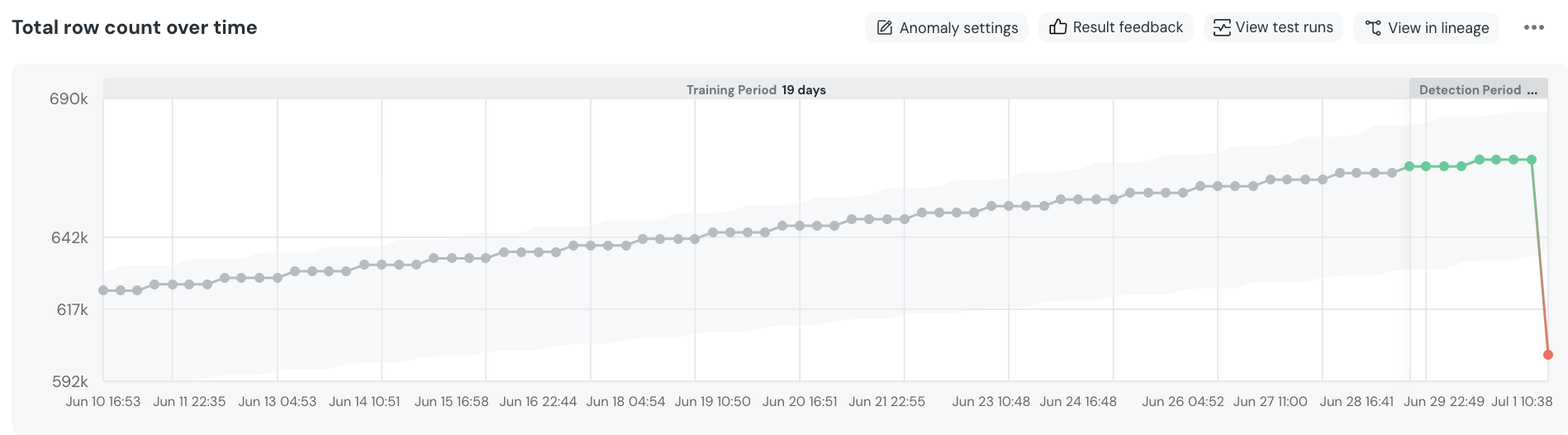
The volume monitor tracks the **total row count** of a table over time, rather than individual table updates.
This means that Elementary will not consider a single update as anomalous, but rather a continuous anomalous trend occurring over a period of time.
### Understand the monitor result
The test data set is divided into two periods -
1. Training Period - The historical behavior of the table's volume, patterns, and so forth. By default it will include 21 days.
2. Detection Period - This is the period within which we look for anomalies. By default it’s set to the last 48 hours.
Data points and expected range -
* Data points within the training period are dark grey, and data points within the detection period are colored.
* The light grey area around the data points represents the model expected range. Data points outside this range are considered anomalous.
* Hovering over a data point will detail the row count timestamp, row count and expected range.
Use the `Anomaly settings` and `result feedback` buttons to impact the monitor.
### Anonmaly settings
* **Anomaly Direction** - Whether you want the monitor to fail on anomalous drops, spikes, or both. Default is both.
* **Sensitivity** - You can set the monitor's sensitivity levels to *Low*, *Medium*, or *High*. In the future, we plan to allow for more nuanced adjustments to this parameter. You can use the `Simulate Configuration` button for testing how the change will affect the monitor.
* **Detection Period** - The period in which the monitor look for anomalies. Default is the last 2 days.
- **Severity** - Should a failure be considered a warning or a failure. Default is warning.
- **Test metadata** - Add metadata such as tags and owner to the test.