> ## Documentation Index
> Fetch the complete documentation index at: https://docs.elementary-data.com/llms.txt
> Use this file to discover all available pages before exploring further.
# Add anomaly detection tests
After you [install the dbt package](/cloud/quickstart#install-the-dbt-package), you can add Elementary data anomaly detection tests.
## Data anomaly detection dbt tests
Elementary dbt package includes **anomaly detection tests, implemented as [dbt tests](https://docs.getdbt.com/docs/building-a-dbt-project/tests)**.
These tests can detect anomalies in volume, freshness, null rates, and anomalies in specific dimensions, among others.
The tests are configured and executed like any other tests in your project.
 ### Table (model / source) tests
#### - Volume anomalies
`elementary.volume_anomalies` Monitors the row count of your table over
time per time bucket (if configured without `timestamp_column`, will count
table total rows).
#### - Freshness anomalies
`elementary.freshness_anomalies` Monitors the freshness of your table
over time, as the expected time between data updates. Requires a
[`timestamp_column`](/data-tests/anomaly-detection-configuration/timestamp-column)
configuration.
#### - Event freshness anomalies
`elementary.event_freshness_anomalies` Monitors the freshness of event
data over time, as the expected time it takes each event to load - that is,
the time between when the event actually occurs (the `event timestamp`), and
when it is loaded to the database (the `update timestamp`). Configuring
`event_timestamp_column` is required, and `update_timestamp_column` is
optional.
#### - Dimension anomalies
`elementary.dimension_anomalies` This test monitors the frequency of
values in the configured dimension over time, and alerts on unexpected changes
in the distribution. It is best to configure it on low-cardinality fields. The
test counts rows grouped by given `dimensions` (columns/expressions).
#### - All columns anomalies
`elementary.all_columns_anomalies` Executes column level monitors and
anomaly detection on all the columns of the table. Specific monitors are
[detailed here](/data-tests/anomaly-detection-configuration/column-anomalies).
You can use `column_anomalies` param to override the default monitors, and
`exclude_prefix` / `exclude_regexp` to exclude columns from the test.
### Column tests
#### - Columns anomalies
`elementary.column_anomalies` Executes column level monitors and anomaly
detection on the column. Specific monitors are [detailed
here](/data-tests/anomaly-detection-configuration/column-anomalies) and can be
configured using the `columns_anomalies` configuration.
### Adding tests examples
```yml Models theme={null}
version: 2
models:
- name: < model name >
config:
elementary:
timestamp_column: < timestamp column >
data_tests:
- elementary.freshness_anomalies:
arguments:
# optional - configure different freshness column than timestamp column
where_expression: < sql expression >
time_bucket:
period: < time period >
count: < number of periods >
- elementary.all_columns_anomalies:
arguments:
column_anomalies: < specific monitors, all if null >
where_expression: < sql expression >
time_bucket:
period: < time period >
count: < number of periods >
- elementary.schema_changes
- elementary.dimension_anomalies:
arguments:
dimensions: < columns or sql expressions of columns >
# optional - configure a where a expression to accurate the dimension monitoring
where_expression: < sql expression >
time_bucket:
period: < time period >
count: < number of periods >
- name: < model name >
## if no timestamp is configured, elementary will monitor without time filtering
columns:
- name: < column name >
data_tests:
- elementary.column_anomalies:
arguments:
column_anomalies: < specific monitors, all if null >
```
```yml Models example theme={null}
version: 2
models:
- name: login_events
config:
elementary:
timestamp_column: 'loaded_at'
data_tests:
- elementary.volume_anomalies:
config:
# optional - use tags to run elementary tests on a dedicated run
tags: ['elementary']
# optional - change severity
severity: warn
- elementary.all_columns_anomalies:
config:
tags: ['elementary']
arguments:
# optional - change global sensitivity
anomaly_sensitivity: 3.5
timestamp_column: 'updated_at'
- elementary.schema_changes:
config:
tags: ['elementary']
severity: warn
- elementary.dimension_anomalies:
arguments:
dimensions:
- event_type
- country_name
where_expression: "event_type in ('event_1', 'event_2') and country_name != 'unwanted country'"
config:
# optional - use tags to run elementary tests on a dedicated run
tags: ['elementary']
# optional - change severity
severity: warn
- name: users
## if no timestamp is configured, elementary will monitor without time filtering
data_tests:
elementary.volume_anomalies
config:
tags: ['elementary']
columns:
- name: user_id
data_tests:
- elementary.column_anomalies:
config:
tags: ['elementary']
arguments:
timestamp_column: 'updated_at'
- name: user_name
data_tests:
- elementary.column_anomalies:
arguments:
column_anomalies:
- missing_count
- min_length
config:
tags: ['elementary']
```
```yml Sources theme={null}
sources:
- name: < some name >
database: < database >
schema: < schema >
tables:
- name: < table_name >
config:
elementary:
timestamp_column: < source timestamp column >
data_tests:
```
```yml Sources example theme={null}
sources:
- name: "my_non_dbt_data"
database: "raw_events"
schema: "product"
tables:
- name: "raw_product_login_events"
config:
elementary:
timestamp_column: "loaded_at"
data_tests:
- elementary.freshness_anomalies
- elementary.dimension_anomalies:
arguments:
dimensions:
- event_type
- elementary.all_columns_anomalies:
arguments:
column_anomalies:
- null_count
- missing_count
- zero_count
- elementary.schema_changes_from_baseline
columns:
- name: user_id
data_type: text
data_tests:
- elementary.column_anomalies
- name: event_name
data_type: text
- name: event_id
data_type: integer
```
## Configure your elementary anomaly detection tests
If your data set has a timestamp column that represents the creation time of a
field, it is highly recommended configuring it as a `timestamp_column`.
To support different types of data sets, the tests have configuration that can be used to customize their behavior.
Read more about [data anomaly detection tests configuration here](/data-tests/elementary-tests-configuration).
We recommend adding a tag to the tests so you could execute these in a dedicated run using the selection parameter `--select tag:elementary`.
If you wish to only be warned on anomalies, configure the `severity` of the tests to `warn`.
## What happens on each test?
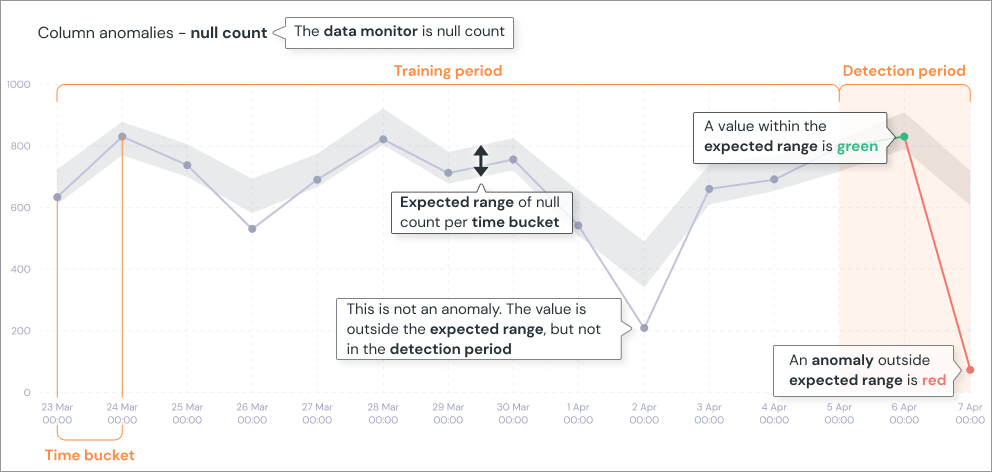
Upon running a test, your data is split into time buckets based on the [`time_bucket`](/data-tests/anomaly-detection-configuration/time-bucket) field and is limited by
the [`training_period`](/data-tests/anomaly-detection-configuration/training-period) var. The test then compares a certain metric (e.g. row count) of the buckets that are within the
[`detection-period`](/data-tests/anomaly-detection-configuration/detection-period) to the row count of all the previous time buckets within the [`training_period`](/data-tests/anomaly-detection-configuration/training-period) period.
If there were any anomalies in the detection period, the test will fail.
On each test elementary package executes the relevant monitors, and searches for anomalies by comparing to historical metrics.
### Table (model / source) tests
#### - Volume anomalies
`elementary.volume_anomalies` Monitors the row count of your table over
time per time bucket (if configured without `timestamp_column`, will count
table total rows).
#### - Freshness anomalies
`elementary.freshness_anomalies` Monitors the freshness of your table
over time, as the expected time between data updates. Requires a
[`timestamp_column`](/data-tests/anomaly-detection-configuration/timestamp-column)
configuration.
#### - Event freshness anomalies
`elementary.event_freshness_anomalies` Monitors the freshness of event
data over time, as the expected time it takes each event to load - that is,
the time between when the event actually occurs (the `event timestamp`), and
when it is loaded to the database (the `update timestamp`). Configuring
`event_timestamp_column` is required, and `update_timestamp_column` is
optional.
#### - Dimension anomalies
`elementary.dimension_anomalies` This test monitors the frequency of
values in the configured dimension over time, and alerts on unexpected changes
in the distribution. It is best to configure it on low-cardinality fields. The
test counts rows grouped by given `dimensions` (columns/expressions).
#### - All columns anomalies
`elementary.all_columns_anomalies` Executes column level monitors and
anomaly detection on all the columns of the table. Specific monitors are
[detailed here](/data-tests/anomaly-detection-configuration/column-anomalies).
You can use `column_anomalies` param to override the default monitors, and
`exclude_prefix` / `exclude_regexp` to exclude columns from the test.
### Column tests
#### - Columns anomalies
`elementary.column_anomalies` Executes column level monitors and anomaly
detection on the column. Specific monitors are [detailed
here](/data-tests/anomaly-detection-configuration/column-anomalies) and can be
configured using the `columns_anomalies` configuration.
### Adding tests examples
```yml Models theme={null}
version: 2
models:
- name: < model name >
config:
elementary:
timestamp_column: < timestamp column >
data_tests:
- elementary.freshness_anomalies:
arguments:
# optional - configure different freshness column than timestamp column
where_expression: < sql expression >
time_bucket:
period: < time period >
count: < number of periods >
- elementary.all_columns_anomalies:
arguments:
column_anomalies: < specific monitors, all if null >
where_expression: < sql expression >
time_bucket:
period: < time period >
count: < number of periods >
- elementary.schema_changes
- elementary.dimension_anomalies:
arguments:
dimensions: < columns or sql expressions of columns >
# optional - configure a where a expression to accurate the dimension monitoring
where_expression: < sql expression >
time_bucket:
period: < time period >
count: < number of periods >
- name: < model name >
## if no timestamp is configured, elementary will monitor without time filtering
columns:
- name: < column name >
data_tests:
- elementary.column_anomalies:
arguments:
column_anomalies: < specific monitors, all if null >
```
```yml Models example theme={null}
version: 2
models:
- name: login_events
config:
elementary:
timestamp_column: 'loaded_at'
data_tests:
- elementary.volume_anomalies:
config:
# optional - use tags to run elementary tests on a dedicated run
tags: ['elementary']
# optional - change severity
severity: warn
- elementary.all_columns_anomalies:
config:
tags: ['elementary']
arguments:
# optional - change global sensitivity
anomaly_sensitivity: 3.5
timestamp_column: 'updated_at'
- elementary.schema_changes:
config:
tags: ['elementary']
severity: warn
- elementary.dimension_anomalies:
arguments:
dimensions:
- event_type
- country_name
where_expression: "event_type in ('event_1', 'event_2') and country_name != 'unwanted country'"
config:
# optional - use tags to run elementary tests on a dedicated run
tags: ['elementary']
# optional - change severity
severity: warn
- name: users
## if no timestamp is configured, elementary will monitor without time filtering
data_tests:
elementary.volume_anomalies
config:
tags: ['elementary']
columns:
- name: user_id
data_tests:
- elementary.column_anomalies:
config:
tags: ['elementary']
arguments:
timestamp_column: 'updated_at'
- name: user_name
data_tests:
- elementary.column_anomalies:
arguments:
column_anomalies:
- missing_count
- min_length
config:
tags: ['elementary']
```
```yml Sources theme={null}
sources:
- name: < some name >
database: < database >
schema: < schema >
tables:
- name: < table_name >
config:
elementary:
timestamp_column: < source timestamp column >
data_tests:
```
```yml Sources example theme={null}
sources:
- name: "my_non_dbt_data"
database: "raw_events"
schema: "product"
tables:
- name: "raw_product_login_events"
config:
elementary:
timestamp_column: "loaded_at"
data_tests:
- elementary.freshness_anomalies
- elementary.dimension_anomalies:
arguments:
dimensions:
- event_type
- elementary.all_columns_anomalies:
arguments:
column_anomalies:
- null_count
- missing_count
- zero_count
- elementary.schema_changes_from_baseline
columns:
- name: user_id
data_type: text
data_tests:
- elementary.column_anomalies
- name: event_name
data_type: text
- name: event_id
data_type: integer
```
## Configure your elementary anomaly detection tests
If your data set has a timestamp column that represents the creation time of a
field, it is highly recommended configuring it as a `timestamp_column`.
To support different types of data sets, the tests have configuration that can be used to customize their behavior.
Read more about [data anomaly detection tests configuration here](/data-tests/elementary-tests-configuration).
We recommend adding a tag to the tests so you could execute these in a dedicated run using the selection parameter `--select tag:elementary`.
If you wish to only be warned on anomalies, configure the `severity` of the tests to `warn`.
## What happens on each test?
Upon running a test, your data is split into time buckets based on the [`time_bucket`](/data-tests/anomaly-detection-configuration/time-bucket) field and is limited by
the [`training_period`](/data-tests/anomaly-detection-configuration/training-period) var. The test then compares a certain metric (e.g. row count) of the buckets that are within the
[`detection-period`](/data-tests/anomaly-detection-configuration/detection-period) to the row count of all the previous time buckets within the [`training_period`](/data-tests/anomaly-detection-configuration/training-period) period.
If there were any anomalies in the detection period, the test will fail.
On each test elementary package executes the relevant monitors, and searches for anomalies by comparing to historical metrics.
 To learn more, refer to [core concepts](/data-tests/how-anomaly-detection-works).
## What does it mean when a test fails?
When a test fail, it means that an anomaly was detected on this metric and dataset. To learn more, refer to [core concepts](/data-tests/how-anomaly-detection-works) and [anomaly detection](/data-tests/data-anomaly-detection).
To learn more, refer to [core concepts](/data-tests/how-anomaly-detection-works).
## What does it mean when a test fails?
When a test fail, it means that an anomaly was detected on this metric and dataset. To learn more, refer to [core concepts](/data-tests/how-anomaly-detection-works) and [anomaly detection](/data-tests/data-anomaly-detection).