> ## Documentation Index
> Fetch the complete documentation index at: https://docs.elementary-data.com/llms.txt
> Use this file to discover all available pages before exploring further.
# Singular Tests
Singular tests in dbt are custom SQL tests that allow you to write specific queries to validate your data. Unlike generic tests (like `not_null` or `unique`) that can be applied to multiple models, singular tests are one-off tests written as SQL queries in `.sql` files within your `tests/` directory.
## What are Singular Tests?
Singular tests are dbt tests defined as standalone SQL files. They are executed when you run `dbt test`, and they pass when the query returns zero rows, or fail when the query returns any rows. This makes them perfect for testing complex business logic, relationships between multiple tables, or custom validation rules that don't fit into standard generic tests.
### How Singular Tests Work
A singular test is simply a SQL query that should return no rows if the test passes. For example:
```sql theme={null}
-- tests/assert_no_null_orders.sql
select *
from {{ ref('orders') }}
where status is null
```
This test will fail if there are any orders with a null status, and pass if all orders have a status value.
## The Multiple Tables Challenge
In singular custom tests, the query can sometimes involve multiple tables. When this happens, there's no unique link between a test and a specific asset. The test may fail, but the incident isn't shown because Elementary doesn't know which asset the test is connected to.
For example, consider this test that joins multiple tables:
```sql theme={null}
select *
from {{ ref('orders') }}
join {{ ref('payments') }}
where status is null
```
When this test fails, Elementary can't determine whether the issue is with the `orders` table or the `payments` table, making it difficult to surface the incident in the right context.
## Solution: Override Primary Test Model ID
To handle this scenario, Elementary provides an option to explicitly define which table is actually being tested using the `override_primary_test_model_id` configuration. This ensures that test failures are properly linked to the correct asset.
### Configuration
You can configure the primary model like this:
```sql theme={null}
{{
config(
severity='error',
override_primary_test_model_id='model.jaffle_shop_online.orders'
)
}}
select *
from {{ ref('orders') }}
join {{ ref('payments') }}
where status is null
```
In this example, even though both `orders` and `payments` are in the query, Elementary will link the test to the `orders` table since it's explicitly set as the primary model.
### Ownership Behavior
When you set `override_primary_test_model_id`, Elementary will use the owner from the specified primary model. In the example above, even though both orders and payments are in the query, Elementary will use the owner from the orders table, since it's explicitly set as the primary model and there is no meta section for this test.
This ensures that:
* Test incidents are properly attributed to the correct asset
* Alerts are routed to the right owners
* The test appears in the correct asset's lineage and catalog page
## Creating Singular Tests in Elementary Cloud
In Elementary Cloud, you can add singular tests through the visual interface.
This workflow creates a test in your dbt project and runs it with your dbt jobs. To run SQL on an Elementary-managed schedule without creating dbt code, use a [custom SQL cloud test](/cloud/features/data-tests/custom-sql-tests).
The UI guides you through:
1. Writing your SQL query
2. Configuring the primary model (if your query involves multiple tables)
3. Setting test metadata like name, description, severity, tags, and owners
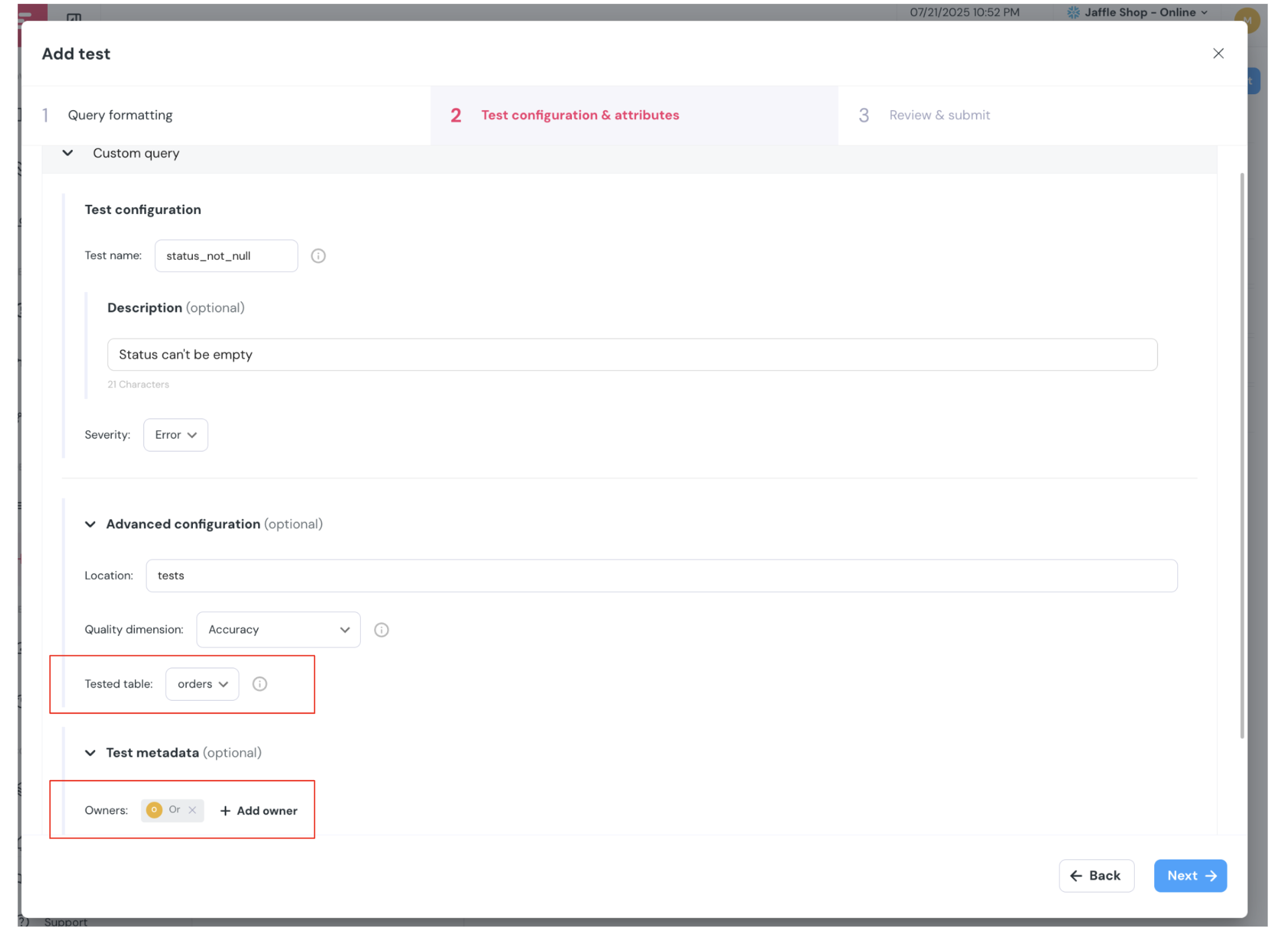 The UI automatically handles the conversion of your test into a proper dbt singular test file, including the `override_primary_test_model_id` configuration when needed.
## Best Practices
* **Use descriptive names** — Name your singular test files clearly to indicate what they're testing (e.g., `assert_orders_have_valid_payments.sql`)
* **Set the primary model** — Always use `override_primary_test_model_id` when your query involves multiple tables to ensure proper incident attribution
* **Add descriptions** — Include comments in your SQL explaining the business logic being tested
* **Configure severity** — Use `severity='error'` for critical tests and `severity='warn'` for non-critical validations
* **Link to assets** — When possible, configure the primary model to link the test to the most relevant asset for better visibility
The UI automatically handles the conversion of your test into a proper dbt singular test file, including the `override_primary_test_model_id` configuration when needed.
## Best Practices
* **Use descriptive names** — Name your singular test files clearly to indicate what they're testing (e.g., `assert_orders_have_valid_payments.sql`)
* **Set the primary model** — Always use `override_primary_test_model_id` when your query involves multiple tables to ensure proper incident attribution
* **Add descriptions** — Include comments in your SQL explaining the business logic being tested
* **Configure severity** — Use `severity='error'` for critical tests and `severity='warn'` for non-critical validations
* **Link to assets** — When possible, configure the primary model to link the test to the most relevant asset for better visibility