> ## Documentation Index
> Fetch the complete documentation index at: https://docs.elementary-data.com/llms.txt
> Use this file to discover all available pages before exploring further.
# Generate observability report
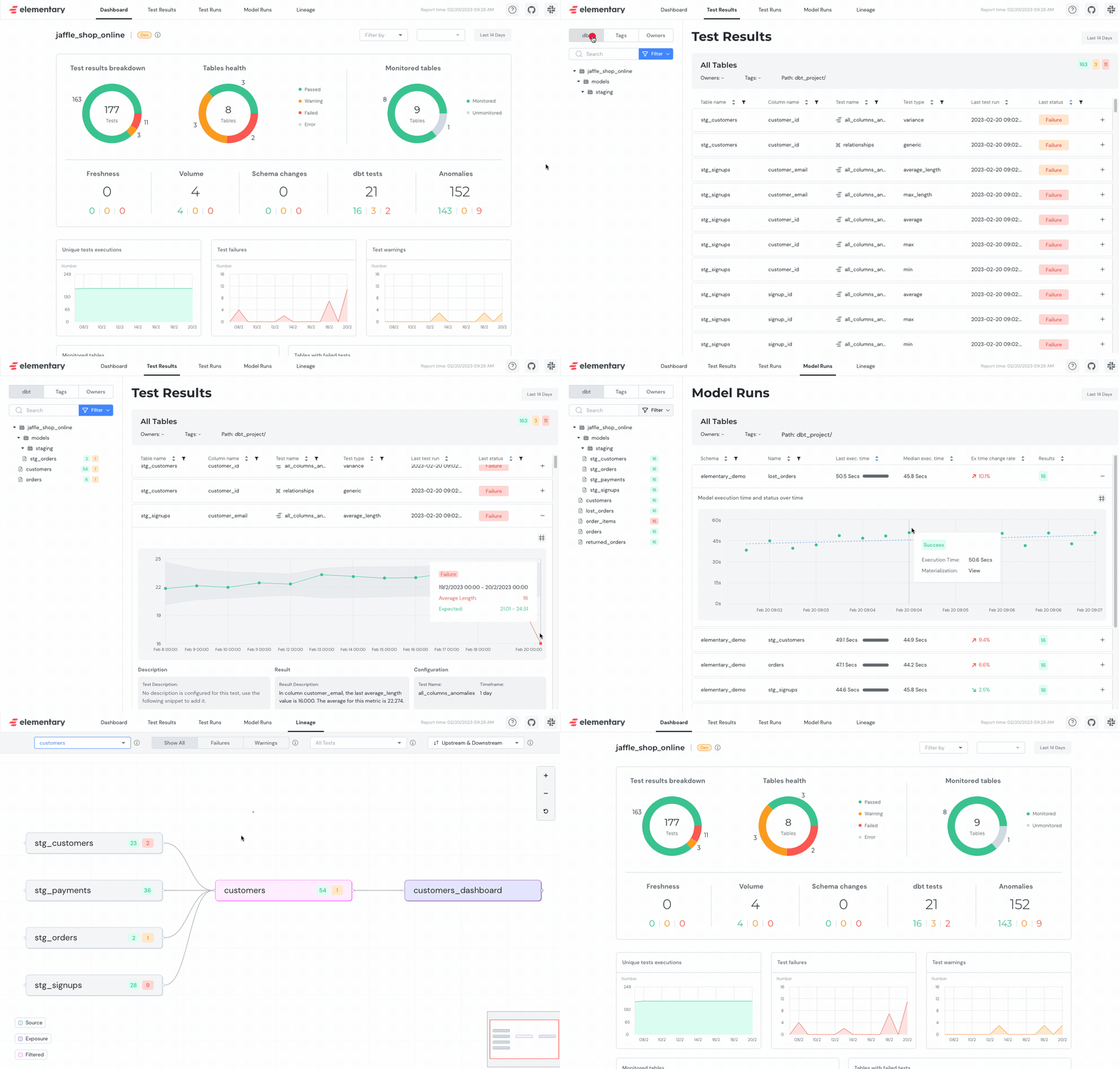
Elementary [data observability report](/cloud/features/collaboration-and-communication/data-observability-dashboard) can be used for visualization and exploration of data from the dbt-package tables. That includes dbt test results, Elementary anomaly detection results, dbt artifacts, tests runs, etc.
 ## Before you start
Before you can start using the report, make sure to install the dbt package, configure a profile and install the CLI.
This is **required for the report to work.**
## How to install Elementary dbt package?
## Configuring the Elementary Profile
In order to connect, Elementary needs a [connection profile](https://docs.getdbt.com/dbt-cli/configure-your-profile) in a file named `profiles.yml`.
This profile will be used by the CLI, to connect to the DWH and find the dbt package tables.
The easiest way to generate the profile is to run the following command within the dbt project where you deployed the elementary dbt package (works in dbt cloud as well):
```shell theme={null}
dbt run-operation elementary.generate_elementary_cli_profile
```
Ensure that you fill in your password and any other missing fields after you
paste the profile in your **local** `profiles.yml` file.
Copy the output, fill in the missing fields and add the profile to your `profiles.yml`.
Here is a demonstration:
## Before you start
Before you can start using the report, make sure to install the dbt package, configure a profile and install the CLI.
This is **required for the report to work.**
## How to install Elementary dbt package?
## Configuring the Elementary Profile
In order to connect, Elementary needs a [connection profile](https://docs.getdbt.com/dbt-cli/configure-your-profile) in a file named `profiles.yml`.
This profile will be used by the CLI, to connect to the DWH and find the dbt package tables.
The easiest way to generate the profile is to run the following command within the dbt project where you deployed the elementary dbt package (works in dbt cloud as well):
```shell theme={null}
dbt run-operation elementary.generate_elementary_cli_profile
```
Ensure that you fill in your password and any other missing fields after you
paste the profile in your **local** `profiles.yml` file.
Copy the output, fill in the missing fields and add the profile to your `profiles.yml`.
Here is a demonstration:
### Elementary profile details and format
* Path: `HOME_DIR/.dbt/profiles.yml`
* Profile name: `elementary`
* Schema name: The schema of elementary models, default is `_elementary`
```yml Snowflake theme={null}
## SNOWFLAKE ##
## By default, edr expects the profile name 'elementary'. ##
## Configure the database and schema of elementary models. ##
## Check where 'elementary_test_results' is to find it. ##
elementary:
outputs:
default:
type: snowflake
account: [account id]
user: [username]
role: [user role]
## Keypair auth (recommended) ##
private_key_path: [path/to/private.key]
# or private_key instead of private_key_path
private_key_passphrase: [passphrase for the private key, if key is encrypted]
database: [database name]
warehouse: [warehouse name]
schema: [schema name]_elementary
threads: 4
```
```yml BigQuery theme={null}
## BIGQUERY ##
## By default, edr expects the profile name 'elementary'. ##
## Configure the database and schema of elementary models. ##
## Check where 'elementary_test_results' is to find it. ##
elementary:
outputs:
default:
type: bigquery
## Service account auth ##
method: service-account
keyfile: [full path to your keyfile]
project: [project id]
dataset: [dataset name] # elementary dataset, usually [dataset name]_elementary
threads: 4
location: [dataset location]
priority: interactive
```
```yml Redshift theme={null}
## REDSHIFT ##
## By default, edr expects the profile name 'elementary'. ##
## Configure the database and schema of elementary models. ##
## Check where 'elementary_test_results' is to find it. ##
elementary:
outputs:
default:
type: redshift
host: [hostname, like hostname.region.redshift.amazonaws.com]
## User/password auth ##
user: [username]
password: [password]
dbname: [database name]
schema: [schema name] # elementary schema, usually [schema name]_elementary
threads: 4
keepalives_idle: 240 # default 240 seconds
connect_timeout: 10 # default 10 seconds
# search_path: public # optional, not recommended
sslmode:
[
optional,
set the sslmode used to connect to the database (in case this parameter is set,
will look for ca in ~/.postgresql/root.crt),
]
ra3_node: true # enables cross-database sources
```
```yml Databricks theme={null}
## DATABRICKS ##
## By default, edr expects the profile name 'elementary'. ##
## Configure the database and schema of elementary models. ##
## Check where 'elementary_test_results' is to find it. ##
elementary:
outputs:
default:
type: databricks
host: [hostname, like .cloud.databricks.com]
http_path: [like /sql/1.0/endpoints/]
schema: [schema name] # elementary schema, usually [schema name]_elementary
token: [token]
threads: [number of threads like 8]
```
```yml Postgres theme={null}
## POSTGRES ##
## By default, edr expects the profile name 'elementary'. ##
## Configure the database and schema of elementary models. ##
## Check where 'elementary_test_results' is to find it. ##
elementary:
outputs:
default:
type: postgres
host: [hostname]
user: [username]
password: [password]
port: [port]
dbname: [database name]
schema: [schema name] # elementary schema, usually [schema name]_elementary
threads: [1 or more]
keepalives_idle: 0 # default 0 seconds
connect_timeout: 10 # default 10 seconds
# search_path: public # optional, not recommended
# role: [optional, set the role dbt assumes when executing queries]
# sslmode: [optional, set the sslmode used to connect to the database]
```
```yml Athena theme={null}
## ATHENA ##
## By default, edr expects the profile name 'elementary'. ##
## Configure the database and schema of elementary models. ##
## Check where 'elementary_test_results' is to find it. ##
elementary:
outputs:
default:
type: athena
work_group: [athena workgroup]
s3_staging_dir: [s3_staging_dir] # Location to store query results & metadata
s3_data_dir: [s3 data dir] # Location to store table data (if not specified, s3_staging_dir is used)
region_name: [aws region name] # AWS region, e.g. eu-west-1
database: [database name]
schema: [schema name] # elementary schema, usually [schema name]_elementary
threads: [number of threads like 8]
```
```yml Clickhouse theme={null}
## Clickhouse ##
## By default, edr expects the profile name 'elementary'. ##
## Configure the database and schema of elementary models. ##
## Check where 'elementary_test_results' is to find it. ##
elementary:
outputs:
default:
type: clickhouse
schema: [schema name] # elementary schema, usually [schema name]_elementary
host: [hostname]
port: [port]
user: [username]
password: [password]
threads: [number of threads like 8]
```
```yml Trino theme={null}
## Trino ##
## By default, edr expects the profile name 'elementary'. ##
## Configure the database and schema of elementary models. ##
## Check where 'elementary_test_results' is to find it. ##
elementary:
outputs:
default:
type: trino
host: [hostname]
port: [port]
database: [database name]
schema: [schema name] # elementary schema, usually [schema name]_elementary
threads: [1 or more]
method: [authentication method] # ldap, oauth etc.
user: [username]
# password: [optional, used with ldap authentication ]
# session_properties: [optional, sets Trino session properties used in the connection]
```
```yml DuckDB theme={null}
## DUCKDB ##
## By default, edr expects the profile name 'elementary'. ##
## Configure the database and schema of elementary models. ##
## Check where 'elementary_test_results' is to find it. ##
elementary:
outputs:
default:
type: duckdb
path: [path to your .duckdb file]
schema: [schema name] # elementary schema, usually [schema name]_elementary
threads: [1 or more]
```
```yml Dremio theme={null}
## DREMIO ##
## By default, edr expects the profile name 'elementary'. ##
## Configure the database and schema of elementary models. ##
## Check where 'elementary_test_results' is to find it. ##
## -- Dremio Cloud -- ##
elementary:
outputs:
default:
type: dremio
cloud_host: api.dremio.cloud # or api.eu.dremio.cloud for EU
cloud_project_id: [project ID]
user: [email address]
pat: [personal access token]
use_ssl: true
object_storage_source: [name] # alias: datalake
object_storage_path: [path] # alias: root_path
dremio_space: [name] # alias: database
dremio_space_folder: [path] # alias: schema, usually [schema]_elementary
threads: [1 or more]
## -- Dremio Software -- ##
elementary:
outputs:
default:
type: dremio
software_host: [hostname or IP address]
port: 9047
user: [username]
password: [password] # or use pat: [personal access token]
use_ssl: [true or false]
object_storage_source: [name] # alias: datalake
object_storage_path: [path] # alias: root_path
dremio_space: [name] # alias: database
dremio_space_folder: [path] # alias: schema, usually [schema]_elementary
threads: [1 or more]
```
```yml Spark theme={null}
## SPARK ##
## By default, edr expects the profile name 'elementary'. ##
## Configure the database and schema of elementary models. ##
## Check where 'elementary_test_results' is to find it. ##
elementary:
outputs:
default:
type: spark
method: [thrift, http, or odbc]
host: [hostname]
port: [port]
user: [username]
schema: [schema name] # elementary schema, usually [schema name]_elementary
threads: [1 or more]
# token: [optional, used with http method]
```
```yml Fabric theme={null}
## FABRIC ##
## By default, edr expects the profile name 'elementary'. ##
## Configure the database and schema of elementary models. ##
## Check where 'elementary_test_results' is to find it. ##
elementary:
outputs:
default:
type: fabric
driver: ODBC Driver 18 for SQL Server
server: [hostname]
port: 1433
database: [database name]
schema: [schema name] # elementary schema, usually [schema name]_elementary
authentication: ActiveDirectoryServicePrincipal
tenant_id: [tenant_id]
client_id: [client_id]
client_secret: [client_secret]
threads: [1 or more]
```
```yml SQL Server theme={null}
## SQL SERVER ##
## By default, edr expects the profile name 'elementary'. ##
## Configure the database and schema of elementary models. ##
## Check where 'elementary_test_results' is to find it. ##
elementary:
outputs:
default:
type: sqlserver
driver: ODBC Driver 18 for SQL Server
server: [hostname]
port: 1433
database: [database name]
schema: [schema name] # elementary schema, usually [schema name]_elementary
user: [username]
password: [password]
threads: [1 or more]
# encrypt: true # default true in dbt-sqlserver >= 1.2.0
# trust_cert: false
```
```yml Vertica theme={null}
## VERTICA ##
## By default, edr expects the profile name 'elementary'. ##
## Configure the database and schema of elementary models. ##
## Check where 'elementary_test_results' is to find it. ##
elementary:
outputs:
default:
type: vertica
host: [hostname]
port: 5433
database: [database name]
schema: [schema name] # elementary schema, usually [schema name]_elementary
username: [username]
password: [password]
threads: [1 or more]
# connection_load_balance: true
# backup_server_node: [comma separated list of backup hostnames or IPs]
```
## Install Elementary CLI
To install the monitor module run:
```shell theme={null}
pip install elementary-data
```
Run one of the following commands based on your platform (no need to run all):
```shell theme={null}
pip install 'elementary-data[snowflake]'
pip install 'elementary-data[bigquery]'
pip install 'elementary-data[redshift]'
pip install 'elementary-data[databricks]'
pip install 'elementary-data[athena]'
pip install 'elementary-data[trino]'
pip install 'elementary-data[clickhouse]'
pip install 'elementary-data[duckdb]'
pip install 'elementary-data[dremio]'
pip install 'elementary-data[spark]'
pip install 'elementary-data[vertica]'
## Postgres doesn't require this step
```
Run `edr --help` in order to ensure the installation was successful.
If you're receiving `command not found: edr` please check our [troubleshooting guide](/oss/general/troubleshooting).
## Generate Tests Report UI
### Execute `edr report` in your terminal
After installing and configuring the CLI, execute the command:
```shell theme={null}
edr report
```
The command will use the provided connection profile to access the data warehouse, read from the Elementary tables, and generate the report as an HTML file.
***
## Generating a report for single invocation
Elementary support filtering the report by invocation on generation.
The filtered report will only include data for the selected invocation (This applies only on the `Test Results` and `Lineage` screens).
There are 3 ways to filter the report by invocation:
* **Last invocation** - Filter by the last invocation (`dbt test` / `dbt build`) that ran.
* **Invocation time** - Filter by the closest invocation (`dbt test` / `dbt build`) to the provided time (the provided time should be in ISO format local time).
* **Invocation id** - Filter by the provided invocation (`dbt test` / `dbt build`) id.
Filters usage example:
```shell edr report invocation filters theme={null}
edr report --select last_invocation
edr report --select "invocation_time:2022-12-25 10:10:35"
edr report --select invocation_id:XXXXXXXXXXXXX
```
***
## Sharing the report
Elementary offers 3 methods that make it easy to share the report with others:
* Send via Slack
* Host on Amazon S3
* Host on Google Cloud Storage (GCS)
Refer to [this guide](/oss/guides/share-report-ui) for detailed instructions.