

not_null or unique) that can be applied to multiple models, singular tests are one-off tests written as SQL queries in .sql files within your tests/ directory.
What are Singular Tests?
Singular tests are dbt tests defined as standalone SQL files. They are executed when you rundbt test, and they pass when the query returns zero rows, or fail when the query returns any rows. This makes them perfect for testing complex business logic, relationships between multiple tables, or custom validation rules that don’t fit into standard generic tests.
How Singular Tests Work
A singular test is simply a SQL query that should return no rows if the test passes. For example:Test shows no assets linked to this test
If a test in Elementary Cloud shows No assets linked to this test, Elementary couldn’t work out which table the test belongs to. The test still runs and its results are still collected, but without a linked asset:- Its incidents don’t show on any asset’s page, lineage, or catalog entry
- It doesn’t inherit owners or tags from a model, so owner-based alert routing can’t reach anyone
Why it happens
When Elementary uploads your dbt artifacts, it picks the test’s primary asset in this order:- The
override_primary_test_model_idsetting, if the test has one (see below). - The test’s parent, if the test depends on exactly one model, source, or snapshot in your project.
- For generic tests, the
modelargument the test was applied to.
model argument, so they are only linked automatically when they reference exactly one node. A singular test ends up with no asset when:
- It references two or more models or sources (a join, or a comparison between tables)
- It references nothing in your project (for example, it only queries tables by their hardcoded name, or only refs models from another package)
orders or payments:
How to fix it: set the primary model
Tell Elementary which asset the test is about withoverride_primary_test_model_id. You can set it in the test’s config:
meta:
<resource_type>.<project_name>.<name>, for example model.jaffle_shop_online.orders or source.jaffle_shop_online.raw.payments. To look it up:
project_name:
parent_model_unique_id is set for the test in <elementary_schema>.dbt_tests.
This setting works for any dbt test, not only singular tests. It’s also the fix for a generic test that shows no asset, for example a custom generic test that references several models.
Ownership behavior
When you setoverride_primary_test_model_id, Elementary uses the owner from the specified primary model. In the example above, even though both orders and payments are in the query, Elementary uses the owner of orders, as long as the test doesn’t set its own owner in meta.
This ensures that:
- Test incidents are properly attributed to the correct asset
- Alerts are routed to the right owners
- The test appears in the correct asset’s lineage and catalog page
Creating Singular Tests in Elementary Cloud
In Elementary Cloud, you can add singular tests through the visual interface.This workflow creates a test in your dbt project and runs it with your dbt jobs. To run SQL on an Elementary-managed schedule without creating dbt code, use a custom SQL cloud test.
- Writing your SQL query
- Configuring the primary model (if your query involves multiple tables)
- Setting test metadata like name, description, severity, tags, and owners
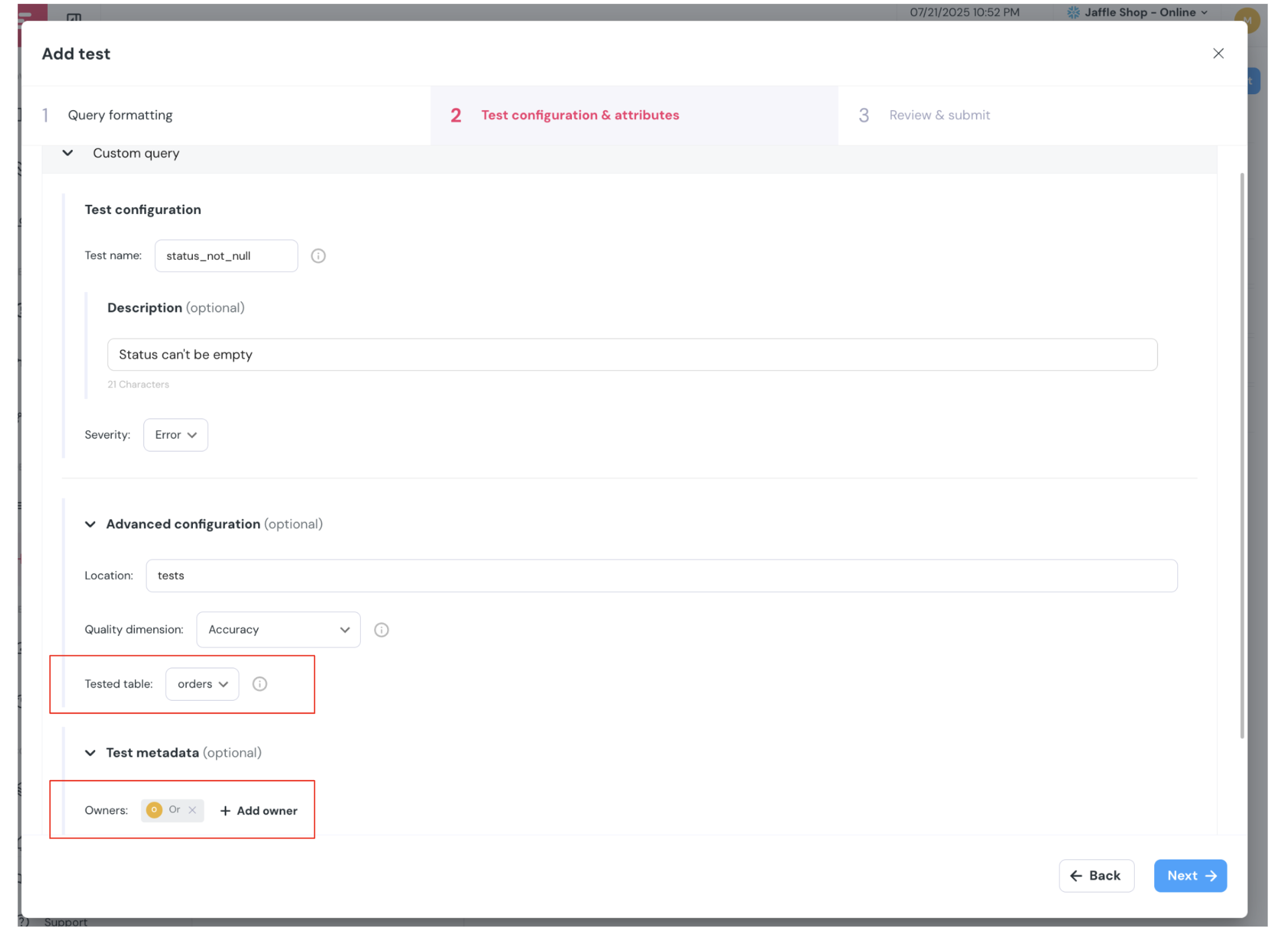 The UI automatically handles the conversion of your test into a proper dbt singular test file, including the
 override_primary_test_model_id configuration when needed.
Best Practices
- Use descriptive names — Name your singular test files clearly to indicate what they’re testing (e.g.,
assert_orders_have_valid_payments.sql) - Set the primary model — Always use
override_primary_test_model_idwhen your query involves multiple tables to ensure proper incident attribution - Add descriptions — Include comments in your SQL explaining the business logic being tested
- Configure severity — Use
severity='error'for critical tests andseverity='warn'for non-critical validations - Link to assets — When possible, configure the primary model to link the test to the most relevant asset for better visibility