

Why it matters
- Security & least privilege — Users only get access to data and actions required for their role.
- Team/group separation — You can separate responsibilities (e.g. analysts, data engineers, reviewers) without interference.
- Compliance readiness — With clearly defined roles, you get better traceability for audits and compliance reviews.
- Flexibility — permissions are configurable per account, environment, and even per asset/test grouping, so you can support complex org structures.
How it works in Elementary
A user’s effective permissions are the sum (union) of all roles and permissions granted to them.
Types of Roles
Roles in Elementary can be divided into two categories: built-in (Admin, editor, viewer) and custom.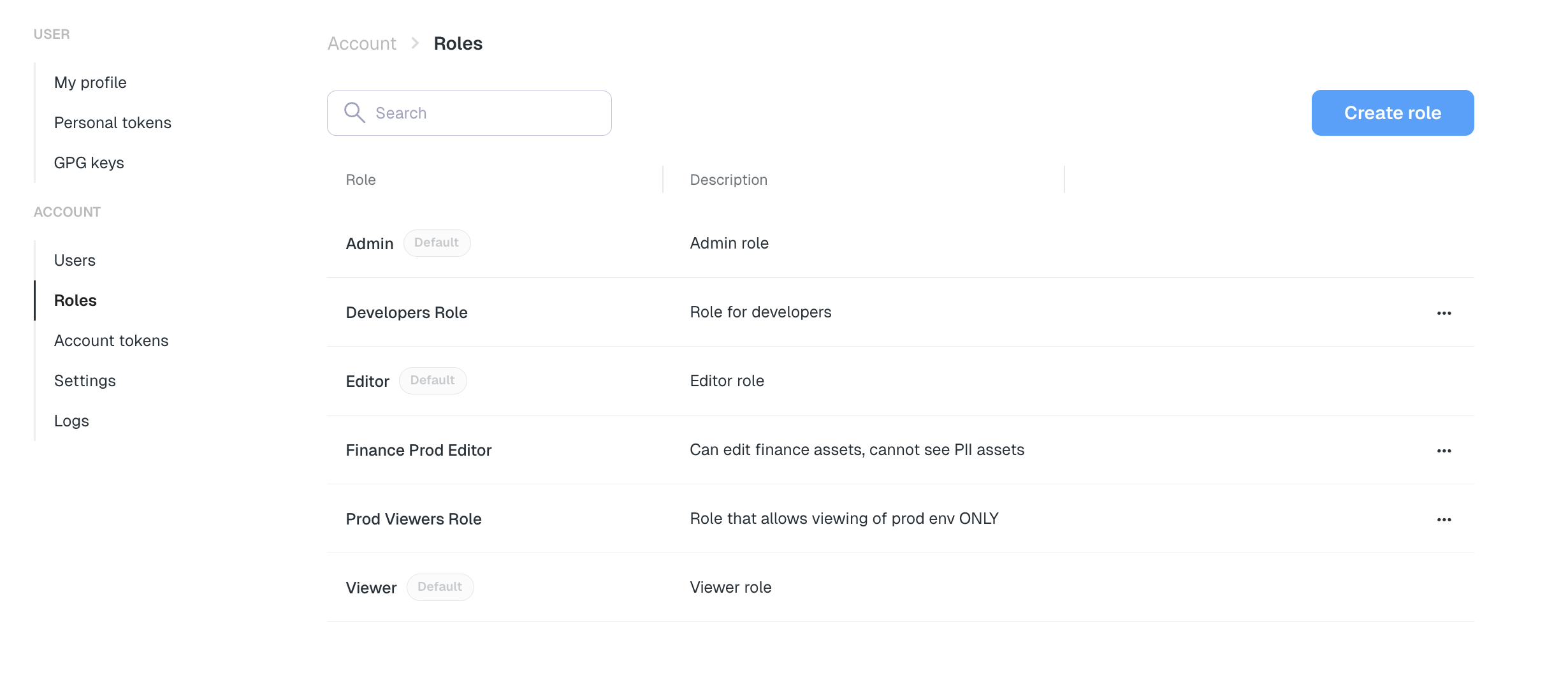
Built-in Roles
Elementary includes default roles most teams can use immediately - Admin, Editor, Viewer:
These roles cover most organizations, but you can extend them with custom roles.
Custom Roles
For each custom rule you can set limited permissions to a subset of environments, pages, or assets/tests (e.g. only Marketing data, or only Prod environments). It’s great for domain-specific teams and business users, ensuring each team only has access to the environments, pages, assets and tests relevant to them.
For each role you need to define role Scope (account-level, environment-level, or asset-level) and permissions type (Read only, Can edit, No permissions).
Each role may include permissions at one, two, or all three levels:
- Account-Level Decide whether the role can view and whether it can edit account-wide configurations such as user management, integrations, and global configurations. Without at least view permissions, account configurations won’t appear for this role.
-
Environment-Level
By default, any role has access to all environments, but you can restrict it to specific ones.
Choose which environments the role applies to, and what the user can do there.
For each environment:
- Feature access — Select which pages (Catalog, Lineage, Alerts, etc.) and features (View/create PRs, AI Agents etc.) are visible.
- Permission type — Set it to read-only, edit or No permissions
-
Resources filters - Assets & Tests (optional)
Use metadata filters to restrict the role to specific datasets or tests.
- Filters — e.g.,
Asset tag = #marketing,Test Owner = @data-team. - Permission type — Choose read-only or edit access (e.g., create tests, update metadata, modify configurations) for each filter group.
- “Resources are by default” — This controls access to resources that don’t match any filter.
- Set to Hidden if you want users to only see the filtered resources (most common for scoped roles).
- Set to Read-only if you want unfiltered resources to still be visible (just not editable).
- Filters — e.g.,
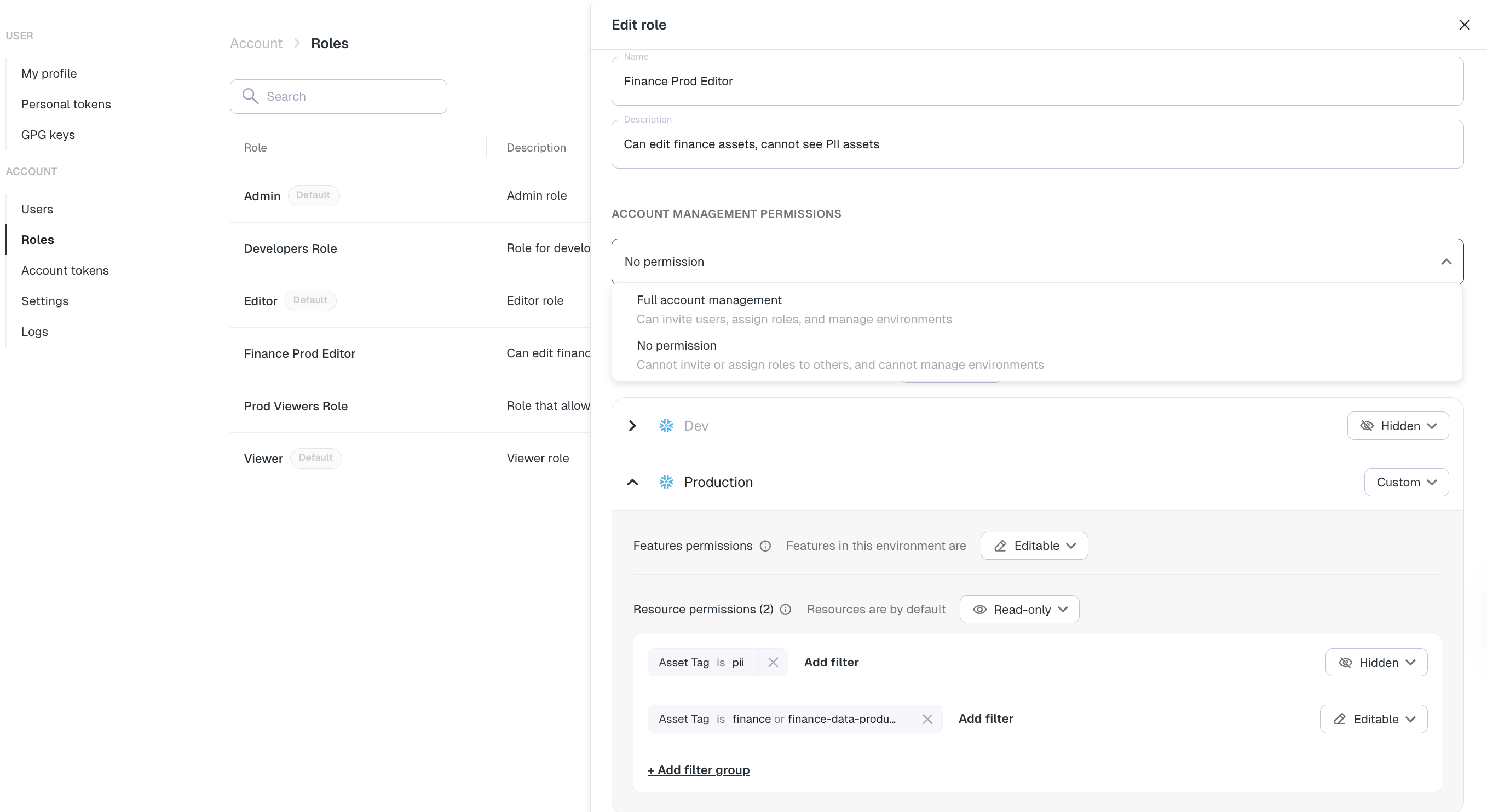
- Account level - No permissions to view/edit account configuration
- Environment level -
- For ‘Prod’ environment - Can edit
- Other environments - Hidden (No access)
- Assets/tests level -
Asset tag = #finance OR Asset tag = #finance-data-product- Can editAsset tag = #PII- Hidden (No access)- All other assets → Hidden (set via “Resources are by default: Hidden”)
Getting started: How to set up roles and permissions
-
Plan your organizational structure
- List out personas in your org (e.g. “Data Engineer”, “Analyst”, “Marketing Analyst”, “Business users”, “DevOps”)
- For each persona, decide:
- Whether they need access to account-level configuration
- Which environments they should be able to access (e.g., Dev, Staging, Prod)
- Which pages, features, and capabilities they should be able to use (Catalog, Lineage, Alerts, manage tests, update metadata, etc.)
- Whether their access should be limited to specific assets or datasets, using filters such as
Asset tag = #PIIorTest Owner = @data-team
-
Create Custom Roles in Elementary (optional)
- Go to Settings → Roles, Click “Create New Role”
- Set the Role Details - Role name - Give it a clear, descriptive name, such as Marketing Analyst, Finance Viewer, Data Steward – Production
- Choose the Role Scope (account-level, environment-level, or asset-level) and permissions type (Read only, can edit) Each role may include permissions at one, two, or all three levels.
-
Assign Users or Groups to built in or custom Roles
- Add individual users or entire groups/teams (via SSO/SCIM integration or manual).
- Users can have multiple roles, permissions are combined (union).
-
Adjust and Evolve Roles over time
- As your org grows or changes, update role definitions or add new roles (e.g. “IT team”, “Business viewer”).
- Reassign or remove roles when people change responsibilities or leave.
Best Practices & Recommendations
- Start with broad roles, then narrow down Begin with general roles (Admin, Data Engineer, Analyst), then create more scoped roles once patterns emerge (e.g. separate “Marketing Data Viewer,” “Finance Data Viewer”).
- Use principle of least privilege Assign only the minimal permissions required. For example, an analyst who only needs to view data should not have edit or delete permissions.
-
Leverage asset/tag-based filters
Use tags like
tag:#marketing,env:prod, to automatically filter access. This lowers maintenance overhead as you add more assets. - Regularly review role assignments Periodically (e.g. quarterly) run the access snapshot and verify that users still need their assigned roles.
- Avoid giving “Admin” widely Reserve account-level Admin or environment-wide write permissions for a small set of trusted users (e.g. data platform or security team).