

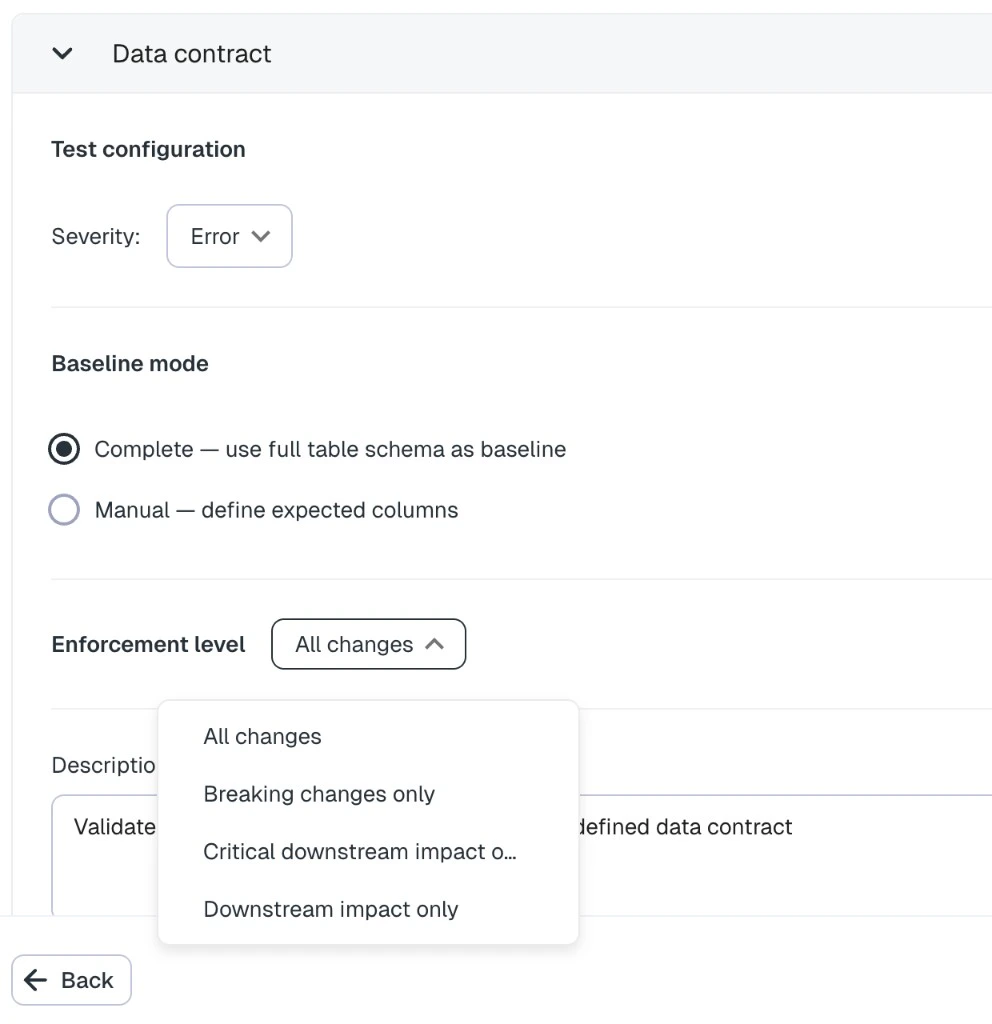
Data contract test configuration in the add-test wizard
How it works
On each run, Elementary compares the table’s current schema in your data warehouse to the test’s baseline. A baseline is a list of columns, each with a name, data type, and nullable flag. The test detects four types of schema changes:
When changes are found, each one is evaluated against the test’s enforcement level. The test fails only if at least one change meets that level. Results show every detected change, including downstream dependency impact per column (tables, BI assets, and whether critical downstream assets are affected).
Data contract tests use warehouse metadata collected during Elementary sync. They do not scan table rows.
Cloud test behavior
Like other cloud tests (automated freshness and volume monitors, anomaly detection monitors), data contract tests:- Are created and configured in the Elementary UI — no pull request or dbt run is required to add them
- Run on Elementary’s schedule as part of cloud test execution
- Appear alongside dbt tests and other monitors in test results, incidents, and coverage views
Baseline modes
When you create a test, choose how the baseline is defined:Complete
Elementary snapshots the table’s full current schema from warehouse metadata and uses it as the baseline. This is the default and works well when the current schema is the contract you want to lock in.Manual
You define the expected columns yourself — name, data type, and nullable flag for each. Use this when the contract is known upfront and may differ from the current warehouse schema, or when you only care about a subset of columns. In manual mode, at least one column with both a name and data type is required before you can submit the test.Enforcement levels
Enforcement level controls which schema changes cause the test to fail:For downstream-based levels, a change with no downstream dependencies does not fail the test, even if the schema changed.
Edit configuration
After creation, open the test from test results or an incident and go to the Configuration tab. You can update:- Baseline columns — edit expected columns manually, or click Capture current schema to replace the baseline with the table’s current warehouse schema
- Enforcement level — change how strictly changes are treated
Test results
When a run detects schema changes, the execution details list each change with:- Change type (added, removed, type changed, nullability changed)
- Current and previous type or nullability where relevant
- Downstream impact: number of downstream table and BI assets, downstream columns, and whether any critical downstream assets are affected
Alerts
Data contract test failures map to the Data contract alert category in alert rules. Include this category in a rule’s test-type filters to receive alerts on data contract failures. By default, the catch-all alert rule may not include every cloud test category. Review your alert rules if you want data contract failures to notify your team.Comparison with dbt schema tests
Elementary also offers dbt-based schema validation tests such aselementary.schema_changes and schema_changes_from_baseline. These run in your dbt pipeline and are managed in code.
Choose data contract tests when you want UI-managed schema enforcement without changing dbt code. Choose dbt schema tests when schema validation should live in version-controlled project code and run with every dbt job.